
Change Provider: Moving your E-Mail Inbox is easy!
0 (0)

Cover picture Provider change E-Mail relocation
Would you like to change provider and move your domain, website and email inboxes to helloly? Good idea! With our mailbox transfer tool, moving your e-mail is very easy.

However, there are a few things to bear in mind. You can find out what these are in this blog post.

Table of Contents

In this article you will learn how easy it is to transfer email inboxes to helloly.

Prepare the email move

To ensure that everything runs smoothly when transferring emails, you should bear the following things in mind:
  • Determine the mailbox sizes of your existing email accounts
  • Make sure that your web hosting package offers sufficient storage space for your email mailboxes. Our information on mailbox size refers to one mailbox.
  • If you need more storage space for your e-mail accounts, we offer a mailbox upgrade. You can book this upgrade several times if required.
  • Create your desired e-mail accounts in the helloly customer center.

Mailbox transfer made easy

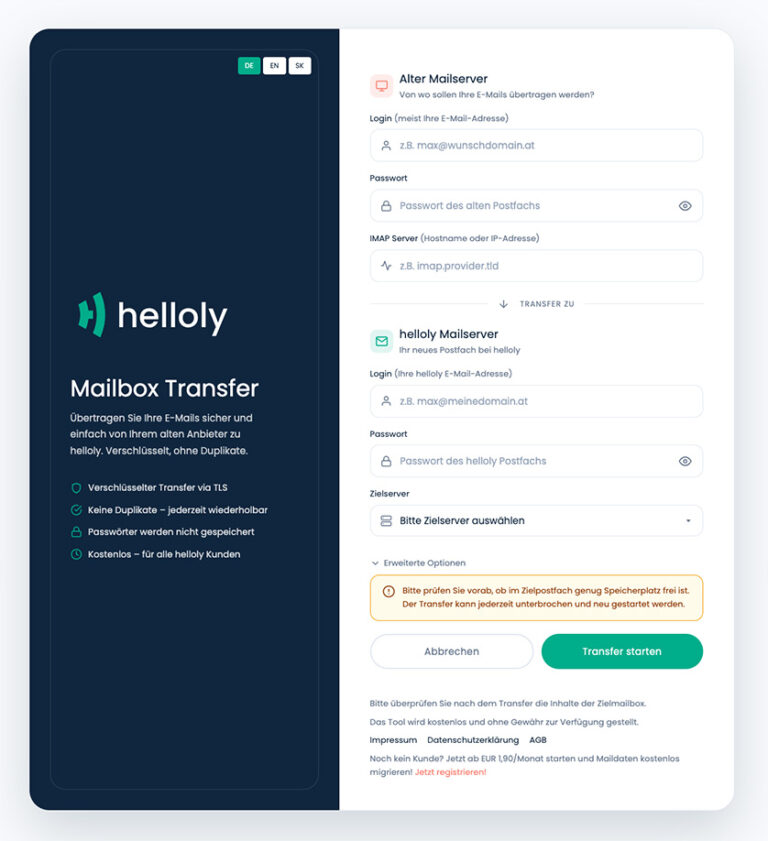
We’ve made our mailbox transfer tool as simple as possible so that you can transfer your email accounts in just three steps.
  1. Enter the access data for your old mail server on the left-hand side.
  2. Enter the access data for your helloly mail server on the right-hand side.
  3. Click on Start transfer.

That’s it. It’s so easy to move your email inboxes to helloly.

Full support for mail transfer

We offer you maximum support to ensure that everything goes smoothly when moving your e-mail inboxes.

You can find step-by-step instructions on how to create and transfer e-mail mailboxes and, if necessary, upgrade your mailbox in our FAQs.

Here you can also find out about the special features of Gmail or Microsoft 365 mailboxes.

If you have any further questions about mail transfer, our support team is always on hand to help and advise you!

You might also be interested in the following article:
Titelbild

Digital Shield: A Secure Password
0 (0)

In our interconnected world, a secure password is the most important shield against cyberattacks. This article explains how to create strong and unique passwords, keep them safe and protect yourself from the most common threats.

Read more »
Wie hat ihnen der Artikel gefallen?
[Total: 0 Durchschnitt: 0]

Leave a Reply

Your email address will not be published. Required fields are marked *