
 Select language

Add text
- Drag the Text element from the Main Toolbar on your website
- Select the desired text template
- Click in the Context Toolbar on Edit Text (alternatively, you can also double-click on the text)
- Write your text
- In the Context Toolbar you will find numerous formatting options such as bold, italic, flush right...
- When you are finished, click on Done
Rich text editor: Editing text
First select the section of text you want to format and then click on the desired formatting option.
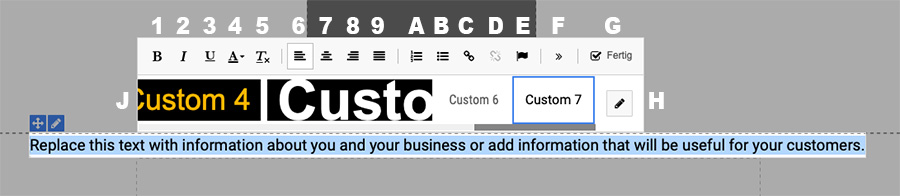
- 1 - Bold
- 2 - Italic
- 3 - Underline
- 4 - Set text color
- 5 - Delete formatting
- 6 - Left-aligned
- 7 - Centered
- 8 - Flush right
- 9 - Write justified text
- A - Insert/remove numbered list
- B - Insert/remove list
- C - Insert/edit link (CMD+K / CTRL+K)
- D - Remove link
- E - Set anchor link
- F - Show more functions (strikethrough, subscript, superscript, background color, font size, show blocks)
- H - Define text styles
- J - Select text templates
Customizing the text
- Links:
Select the text section to be linked and click on C - Insert link - Anchor:
Select the text excerpt to be linked and click on E - Set anchor
