
Knowledgebase

How do I change the owner data of a domain?

FAQ Bild

Change owner data for all domains

If you change your customer data, the owner data of all connected domains will also be changed automatically. To change your customer data, proceed as follows:

  • Access the helloly Customer Center via my.helloly.com

  • Click in the left menu click on Account details and select Edit account details

  • Make the desired changes

  • Confirm by clicking on the button Save changes

Change owner data for a specific domain

You can edit the owner data for each domain. To do this, proceed as follows:

  • Access the helloly customer center via my.helloly.com

  • Click in the left menu click on Domains and select My domains

  • In the line of the desired domain, click on the arrow next to the tool iconto open the drop-down menu and then select Edit contact information
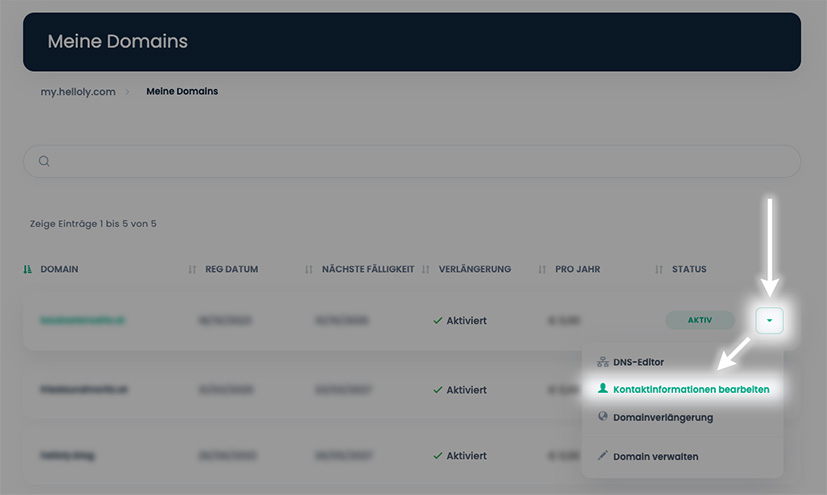
  • Make the desired changes to Registrant contact field

  • Scroll all the way down and confirm the changes by clicking on Save changes

Was this answer helpful?

Related Articles

When is a .at domain available in the DNS?

After successfully registering a .at domain or transferring a .at domain, it may take some time before your domain is available. The .at nameserver...

Can an umlaut domain or a domain with numbers be registered?

Yes, this is possible in many cases. However, there are restrictions depending on the domain extension. Use our domain check to check whether your...

Is it possible to change a domain name?

Unfortunately not. Domains are created and billed by the respective registry directly after the initial registration. If you wish to change your...

Can I freely choose the website document root folder of an add-on domain?

Yes, you can freely select the root folder. Proceed as follows: Select website document root folder Log in to the Customer Center at...

Can I redirect a subdomain to an external site?

Yes, you can redirect a subdomain to an external website. To do this, proceed as follows: Forward subdomain to external website Log in to the...
