
 Sprache wählen

Im cPanel gibt es zwei Möglichkeiten, den Speicherbedarf für ein E-Mail Konto in Erfahrung bringen.
Möglichkeit 1: “Speicherplatznutzung durch E-Mails”
- Steigen Sie via my.helloly.com in das Kundencenter ein
- Klicken Sie neben dem gewünschtem Webhosting Paket auf Webhosting Login
- Im cPanel klicken Sie unter E-Mail auf die Funktion Speicherplatznutzung durch E-Mails
- Sie können nun …
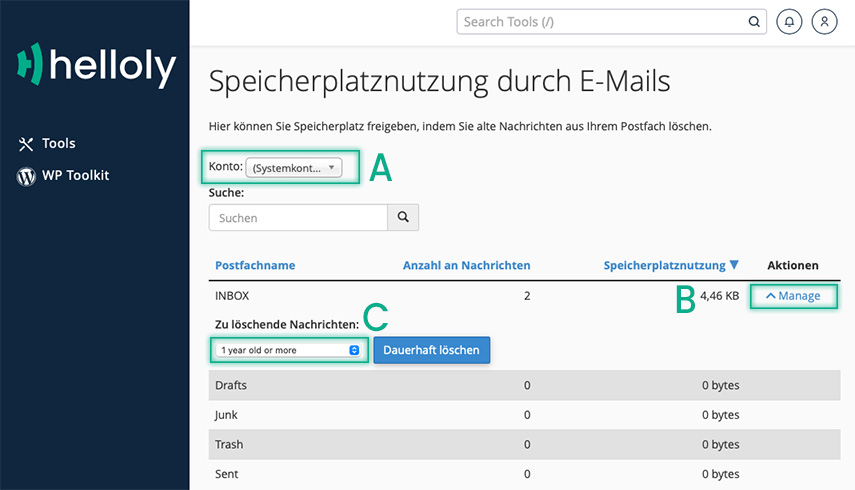
- ... im Dropdown Menü A das gewünschte E-Mail Konto auswählen
- unter Speicherplatznutzung sehen Sie den aktuellen Speicherbedarf
- ... mit einem Klick auf B – Manage ein Postfach im Detail anzeigen
- ... im Bereich C E-Mails löschen, die ...
- ... 1 year old or more – älter als ein Jahr sind
- ... 30 MB in size or more – 30 MB oder größer sind
- ... Bereits aufgerufen wurden
- ... Alle Nachrichten
- ... Benutzerdefinierte Abfrage
- ... im Dropdown Menü A das gewünschte E-Mail Konto auswählen
- Mit einem Klick auf Dauerhaft löschen können Sie E-Mails nach den vorher festgelegten Kriterien löschen
Möglichkeit 2: "E-Mail-Konten"
- Steigen Sie via my.helloly.com in das Kundencenter ein
- Klicken Sie neben dem gewünschten Webhosting Paket auf Webhosting Login
- Im cPanel klicken Sie unter E-Mail auf die Funktion E-Mail-Konten
- Sie sehen nun sämtliche E-Mail Konten auf einen Blick und können sofort ablesen …
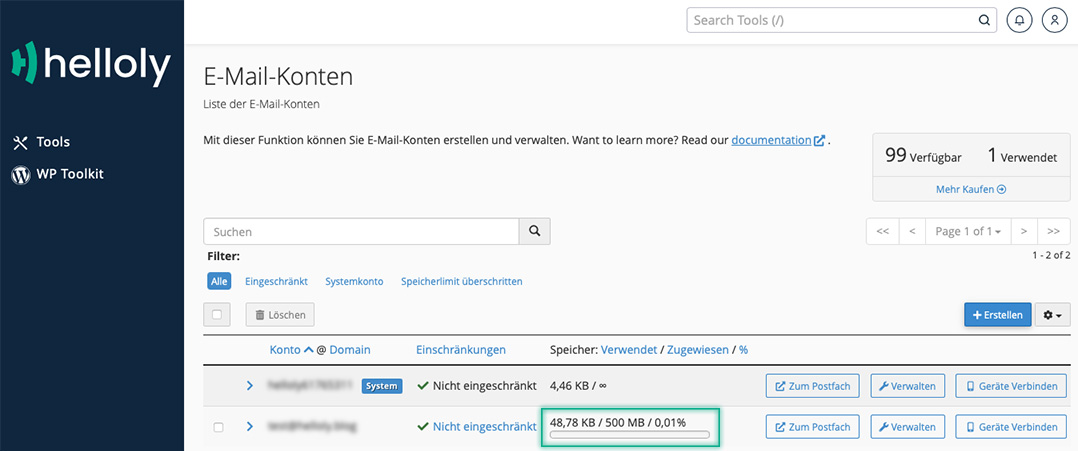
- ... wieviel Speicherplatz ein Konto benötigt
- ... wieviel Speicherplatz einem Konto zugewiesen ist
- ... zu wieviel Prozent der Speicherplatz ausgeschöpft ist
Sie benötigen mehr Speicherplatz für Ihre E-Mail Konten?
Im helloly Kundencenter finden Sie unser Mailbox Upgrade, mit dem Sie den Speicherplatz Ihrer E-Mail Konten um 10 GB erweitern können. Benötigen Sie noch mehr Speicherplatz, können Sie dieses Paket auch mehrmals buchen.
So buchen Sie das Mailbox Upgrade
- Steigen Sie via my.helloly.com in das Kundencenter ein
- Klicken Sie im Menü auf Webhosting Pakete
- Wählen Sie Verfügbare Addons
- Klicken Sie beim +10 GB Mailbox Upgrade auf Auswählen
Hinweis: Sollten Sie mehrere Webhosting Pakete haben, wählen Sie das passende im Dropdown Menü aus
