
Knowledgebase

How can I adjust the spam rating?

FAQ Bild

You can adjust the spam rating of the Apache SpamAssassin in the cPanel.


Configure Apache SpamAssassin

  • Log in to the Client Area via my.helloly.com.
  • Next to the desired hosting product, click Webhosting Login
  • Under Email go for Spam Filters
  • Under Process New Emails and Mark them as Spam: click on Spam Threshold Score (5)
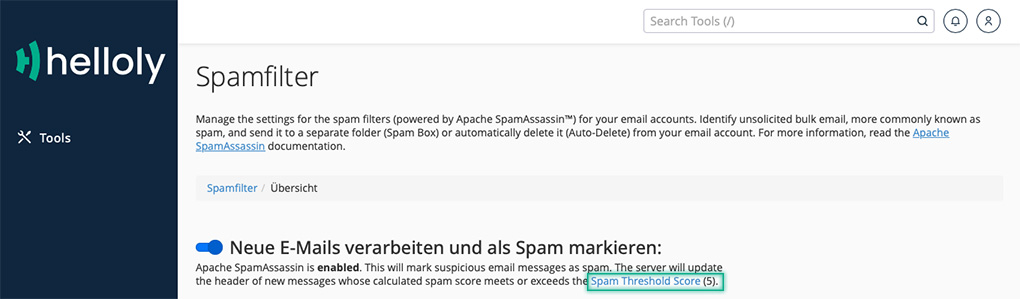
  • Apache SpamAssassin allows you to set the spam threshold between 1 (very aggressive, many emails are incorrectly classified as spam) and 10 (very passive, only very obvious emails are classified as spam). By default, the value is set to 5. Depending on whether too many or too few emails are recognized as spam, you can adjust the threshold value. To do this, select the desired value in the drop-down menu Default (5) (Current) or click on Custom to enter the desired value.

  • Confirm by clicking on Update Scoring Options.

Was this answer helpful?

Related Articles

Email clients: What are the special features of Android?

We have tested different email clients on different operating systems to give you the best experience. We noticed the following special features...

Email clients: What are the special features of iOS?

We have tested different email clients on different operating systems to give you the best experience. We noticed the following special features on...

Email clients: What are the special features of Windows 10?

We have tested different email clients on different operating systems to give you the best experience. We noticed the following special features...

Email clients: What are the special features of MacOS?

We have tested different email clients on different operating systems to give you the best experience. We noticed the following special features...

What are the login details for my e-mail account?

For example, you own the domain newproject.comdomain, have already set up an e-mail account and would now like to create this mailbox in your...