
Knowledgebase

How do I specify a signature in the webmail client?

FAQ Bild

How to create a signature in the helloly Webmail Client:

  • Log in via webmail.helloly.com
  • Go for roundcube and click Open
  • Within the menu go for Settings and select Identities
  • Select your Identity and complete the settings as required
  • Under Signature you can create your signature
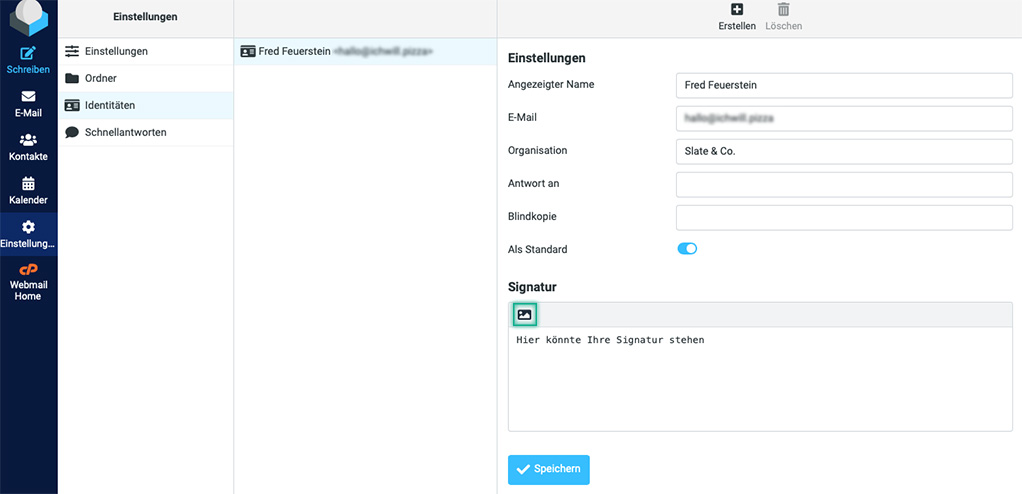
  • Click on the Image Symbol to activate HTML mode, which allows you to format your signature using HTML. Important: If you format your signature using HTML, you must set the Compose HTML messages function to Always in the settings.
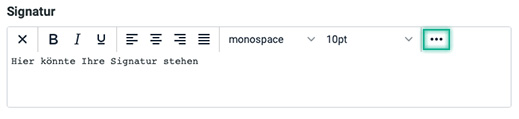
  • Click on the ...–Icon to display further options
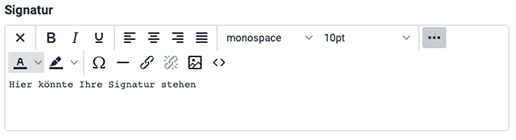
  • Once you have created the signature according to your wishes, confirm by clicking on Save

Note: You can also activate the HTML mode when composing emails using the image icon and then click on the "..." icon to show additional options.

Was this answer helpful?

Related Articles

Email clients: What are the special features of Android?

We have tested different email clients on different operating systems to give you the best experience. We noticed the following special features...

Email clients: What are the special features of iOS?

We have tested different email clients on different operating systems to give you the best experience. We noticed the following special features on...

Email clients: What are the special features of Windows 10?

We have tested different email clients on different operating systems to give you the best experience. We noticed the following special features...

Email clients: What are the special features of MacOS?

We have tested different email clients on different operating systems to give you the best experience. We noticed the following special features...

What are the login details for my e-mail account?

For example, you own the domain newproject.comdomain, have already set up an e-mail account and would now like to create this mailbox in your...