
Knowledgebase

How do I format Emails within the Webmail Client with HMTL?

FAQ Bild

In the helloly webmail client, you can format your emails using HTML. To format e-mails using HTML as standard, proceed as follows:

  • Log in with your access data via webmail.helloly.com
  • Go for roundcube and click Open
  • Within the Menu go for Settings and select Preferences
  • Within Composing Messages under Main Options go for Compose HTML messages
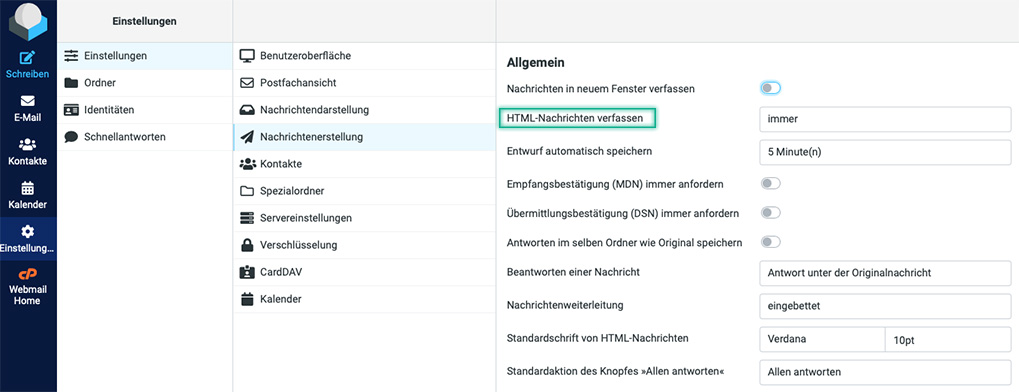


    Here you can choose from various options:

    • never

    • only reply to HTML messages

    • when forwarding and replying to HTML messages

    • always

    • always, except when replying to plain text

  • Once you have made your settings, confirm by clicking on Save


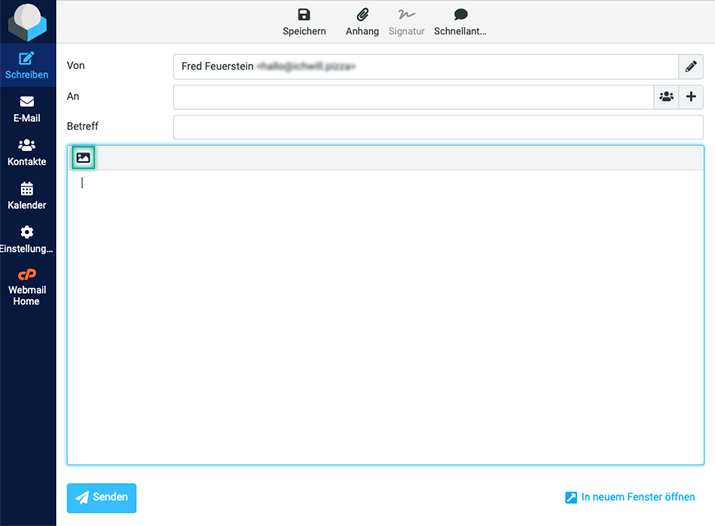
Formatting individual e-mails with HTML

When composing an e-mail, you can switch between HTML formatting and plain text by clicking on the image symbol

Was this answer helpful?

Related Articles

Email clients: What are the special features of Android?

We have tested different email clients on different operating systems to give you the best experience. We noticed the following special features...

Email clients: What are the special features of iOS?

We have tested different email clients on different operating systems to give you the best experience. We noticed the following special features on...

Email clients: What are the special features of Windows 10?

We have tested different email clients on different operating systems to give you the best experience. We noticed the following special features...

Email clients: What are the special features of MacOS?

We have tested different email clients on different operating systems to give you the best experience. We noticed the following special features...

How do I create e-mail filters?

Global / Individual Email Filters: Access the helloly customer center via my.helloly.com. Under your active products, click on Log in to...
