Knowledgebase

How can I block e-mail addresses due to spam? (blacklisting)

FAQ Bild

Apache SpamAssasin is activated for all web hosting and mail-only packages from Helloly to protect you from unwanted advertising emails (spam). To additionally define certain e-mail addresses as spam, add them to the blacklist. This means that emails from this sender are always marked as spam.

Add sender to blacklist

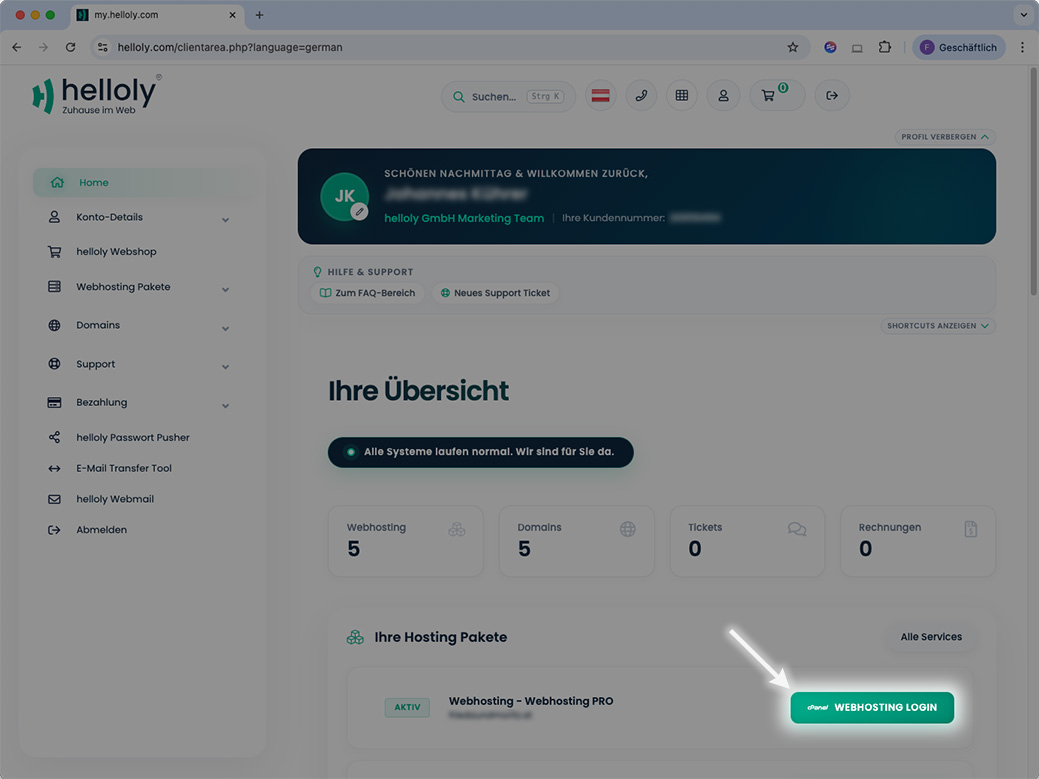
  1. Log in to the customer center via my.helloly.com. Under Your Active Products/Services you will find your active web hosting packages. Select the desired product and click on Log in to cPanel.

  2. Within the Tools section under Email click on the function Spam Filters.

  3. Under the item Additional Configurations (For Advanced Users): click on Show Additional Configurations.

  4. Here you will find the function Blacklist. To edit the blacklist, click on Edit Spam Blacklist Settings.

  5. You can now click on the function Add A New "blacklist_from" Item to enter a new spam sender. Simply enter the desired e-mail address.

  6. If you want to block all e-mail addresses of a domain, use the following formatting: *@domain.com

  7. Finally, click on Update Blacklist (blacklist_from).

Was this answer helpful?

Related Articles

Email clients: What are the special features of Android?

We have tested different email clients on different operating systems to give you the best experience. We noticed the following special features...

Email clients: What are the special features of iOS?

We have tested different email clients on different operating systems to give you the best experience. We noticed the following special features on...

Email clients: What are the special features of Windows 10?

We have tested different email clients on different operating systems to give you the best experience. We noticed the following special features...

Email clients: What are the special features of MacOS?

We have tested different email clients on different operating systems to give you the best experience. We noticed the following special features...

How do I create e-mail filters?

Global / Individual Email Filters: Access the helloly customer center via my.helloly.com. Under your active products, click on Log in to...