Knowledgebase

How can I cancel my web hosting package?

FAQ Bild
  • Log in to the customer center at my.helloly.com.
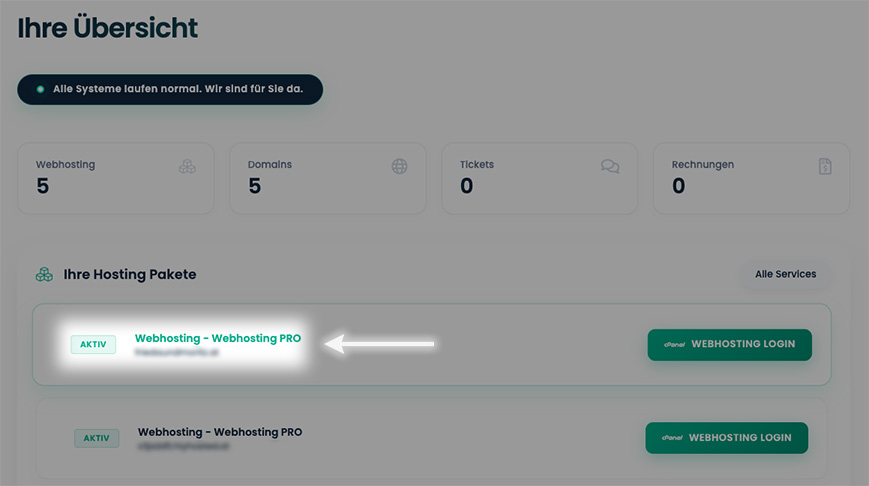
  • Click in the dashboard under Your active products click on the desired package Show details.
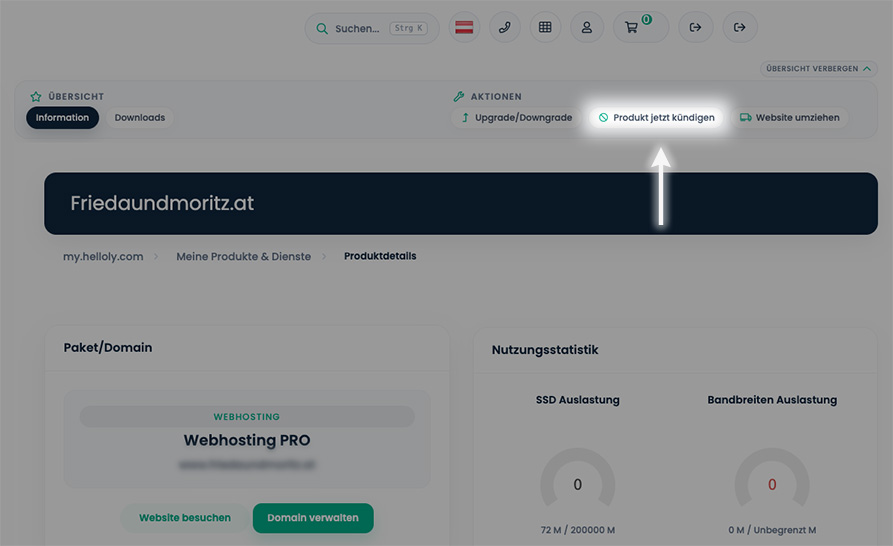
  • Click in the right-hand menu under Actions click on the menu item Cancel product now.
  • Optional: Enter a reason for termination in the "Reason for termination" text field.
  • If you would also like to cancel all connected domains, select the following in the field Cancel domain too? the option I confirm that I do not wish to renew the domain.
  • You can select the cancellation date in the drop-down menu Cancellation date either to Immediately or to End of the billing period set.
  • With a click on the button Cancel product now to end your contractual relationship.

Was this answer helpful?

Related Articles

Is Anonymous FTP allowed?

Anonymous FTP is an FTP service that does not require a password to access the data and therefore represents a security risk for your data. For...

Does helloly offer http/2 in web hosting?

Yes, all web hosting packages have http/2 activated for optimum performance and security.

Is an additional memory cache / opcache necessary with NextCloud?

No, even if NextCloud reports a missing memory cache / opcache after installation. We use PHP-FPM as a caching solution on our servers, but this is...

Do I need a web hosting package?

After the first step - finding a good domain name - you need a web hosting package if you want to publish your own website. Helloly provides the...

Does helloly offer gzip compression in web hosting?

Yes, gzip compression is available for all web hosting packages and is deactivated by default.   Activate gzip compression Access the...