
 Select language

The .htaccess file is used to control how visitors access your website. The .htaccess is a text file where redirects can be configured or access to certain files or folders can be restricted.
The .htaccess file is located in the root directory of your hosting within the public_html folder. If you have additional add-on domains, you will find the respective .htaccess file in the corresponding subfolder.
To display the .htaccess file, proceed as follows:
-
Log in to the helloly customer center
-
Next to the desired hosting package, click on Webhosting Login

-
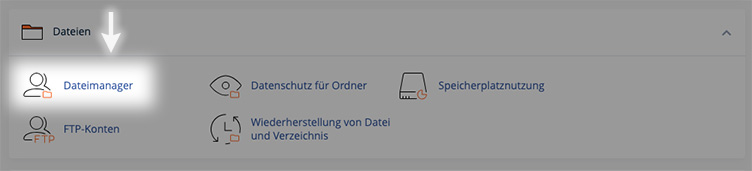
Navigate to the section Files and click on File Manager
-
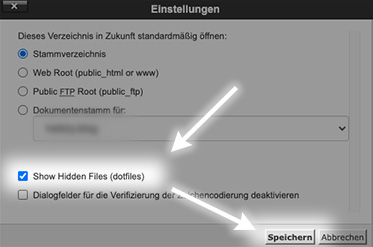
In the top right corner, click on the Settings button

-
Select the option Show Hidden Files and confirm with Save
-
Now all hidden files (which start with a dot in the filename) will be displayed
-
In the public_html directory, you will now find the .htaccess file of your main domain
If you have add-on domains, you will find a corresponding subfolder for each domain inside the public_html folder. Inside that subfolder, you will find the .htaccess file for that specific domain.
